

Signing in to MyStake usually takes a few seconds. But an incorrect password, outdated saved details or a pending account check can get in the way. The MyStake login page gives you access to your balance, transactions, account settings and available rewards.
You can use the same account on your phone or computer. If something stops you from signing in, you can check the problem, reset your password or contact support.
Log In to Your Account
MyStake lets you sign in with your registered email address or username. You don't need separate accounts for casino games and sports betting.
Log In with Email and Password
The MyStake casino login form has two fields: Username/Email and Password. Enter either your registered username or email address, then add your password.
To access your account:
- Open the MyStake website.
- Select Log In.
- Enter your username or email and password.
- Submit the form to sign in.
If your details are rejected, check the spelling and capital letters. Your browser may also have filled in an old password, so try entering it manually.
After signing in, you can open your profile to view account information, transaction history or available promotions.
Mobile Login
MyStake works through mobile browsers, including Safari and Chrome. Open the website on your phone, use the sign-in option and enter your usual credentials.
You can access casino games, sports markets and account settings without switching to a different profile.
If the mobile page freezes or won't load:
- Refresh the page. This may fix a temporary loading problem.
- Switch networks. Try Wi-Fi or mobile data.
- Update your browser. An older version may cause display problems.
- Clear the site's cache. This can help if the page keeps loading incorrectly.
For MyStake casino UK login searches, check that you're opening the intended website rather than a similarly named page.
New to MyStake?
You'll need to register before using a personal MyStake account. The sign-up form lets you create your credentials, enter your personal information and select a currency.
GBP is among the available account currencies. Your final options may depend on the country selected during registration.
Create a New Account
Open the registration form and fill in the required fields.
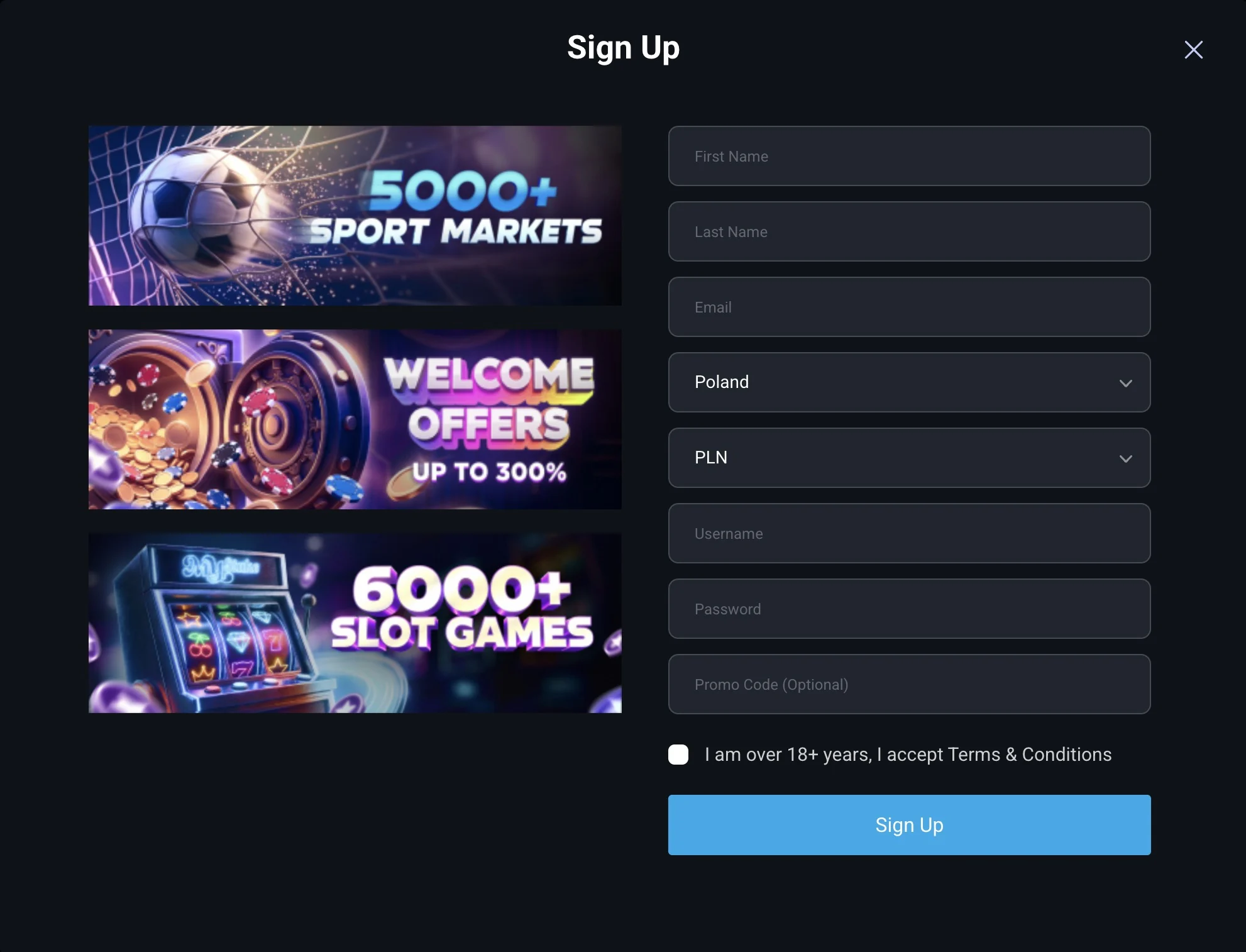
- Choose a username. Pick something you'll remember when signing in.
- Add your email address. Use an inbox you can access for confirmation and recovery.
- Set a password. Make it unique and difficult to guess.
- Enter your personal details. Provide the information requested in the form.
- Choose a currency. Select GBP if it's available for your account.
- Complete registration. Check the information and confirm the required terms.
Make sure your name, date of birth and contact details are correct. You may need to confirm this information during identity verification.
MyStake allows one account per player under its account rules. Opening another one to claim the same promotion or get around a restriction may lead to additional checks.
Account Verification
MyStake may ask you to verify your identity before approving a withdrawal or certain account changes. Even if you've already made a deposit, a payment request can require extra documents.

For example, when withdrawing to a bank account, you may need to show that it belongs to you.
| Verification | What you may need |
|---|---|
| Identity | Passport, national ID or driving licence |
| Address | Recent document with your name and address |
| Payment method | Proof of card, bank account or wallet ownership |
| Account information | Details matching your registration |
Send clear images and make sure the information matches what you entered when signing up. A different spelling of your name, an expired document or a blurry photo may delay verification.
MyStake may request additional proof if the first submission isn't enough.
Account Access Help
A failed MyStake UK login can happen for several reasons. The issue may be with your credentials, browser or account status. Match the error you're seeing to the next step.
| Problem | What to do |
|---|---|
| Wrong username or email | Check the address or username you registered with |
| Password rejected | Enter it manually or use password recovery |
| Login page won't load | Try another browser or network |
| Verification pending | Follow the instructions in your account |
| Account restricted | Contact customer support |
| Recovery email missing | Check spam and your registered inbox |
If the problem continues, MyStake offers support through live chat and email at [email protected].
Reset Your Password
The "Forgot Password?" option lets you start account recovery from the sign-in form.
- Select "Forgot Password?" on the login screen.
- Enter the email address linked to your account.
- Open the recovery message sent to your inbox.
- Follow the instructions to set a new password.
- Return to MyStake and sign in again.
If the email doesn't arrive, check your spam folder. Make sure you're using the address connected to your account before requesting another message.
Lost access to that inbox? Contact support to discuss recovery. You may need to prove that the account belongs to you before any details can be changed.
Keeping Your Login Details Secure
Your MyStake log in details protect your balance, payment history and personal information. Use a few basic precautions to keep others from accessing your account:
- Choose a strong password. Use a different one for each account.
- Keep recovery messages private. Never share reset instructions or verification codes.
- Avoid public computers. Don't save your sign-in details on shared devices.
- Watch for fake pages. Check the website address before entering personal information.
- Check transactions. Report any payment or account change you don't recognise.
If you suspect someone has accessed your account, update your password and contact support. Include any relevant transaction details, but don't share your password.